
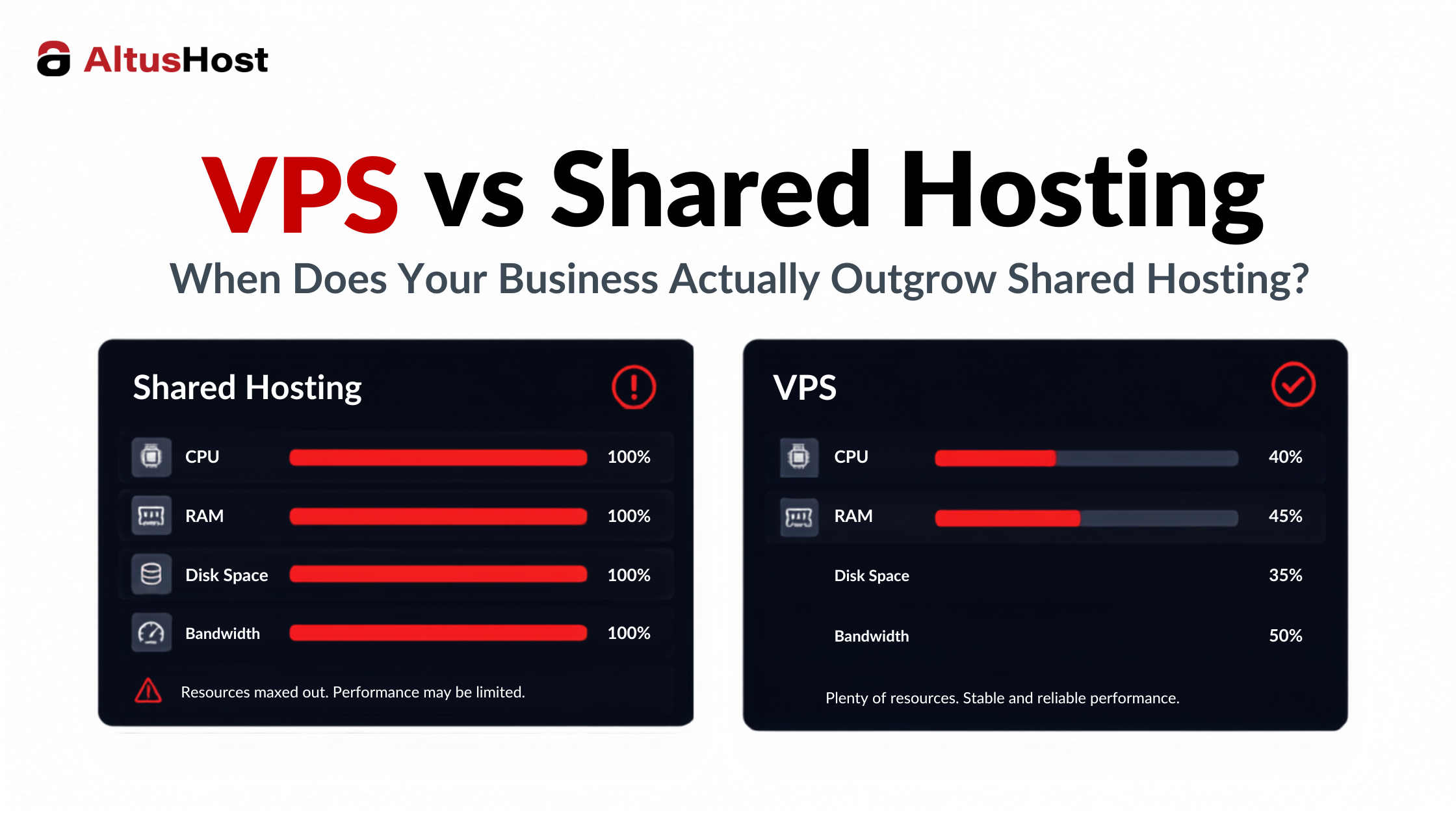
Your shared hosting plan probably isn’t going to send you an email that says you have officially outgrown us. It just starts showing up in smaller ways.
A resource limit notification you didn’t get last month. A support ticket about CPU throttling that gets resolved but comes back a few weeks later. Your site loading fine at 2am and struggling at 2pm, even though nothing about your traffic looks unusual to you. These are the actual signals, not a generic checklist, and they tend to show up gradually before anyone officially decides to look for something better.
Here’s what those specific symptoms usually mean, and what changes when you move to a VPS.
The Technical Signals That Actually Matter
Start with resource limit notifications. Shared hosting plans cap CPU, memory, and sometimes the number of processes your site can run at once. When you start getting warnings about hitting those caps, and it isn’t a one time traffic spike from a viral post, that’s usually a sign your baseline usage has moved past what the plan was built for.
Slow loading at moderate traffic is another one. If your site loads fine with a handful of visitors but slows down noticeably once you’re at, say, 50 or 100 concurrent users, and there’s nothing obviously wrong with your code, the bottleneck is often the shared environment itself rather than anything you built.
Then there’s the noisy neighbor problem, which is the one people find hardest to diagnose because it isn’t caused by anything you did. On shared hosting, your site sits on the same physical server as dozens or hundreds of other accounts. If one of them runs a poorly optimized plugin, gets hit with a traffic spike, or attracts bot traffic, your site can slow down too, with no warning and no obvious cause on your end.
If you’re an agency managing several client sites on the same shared hosting account, this problem multiplies. One client’s traffic spike or misconfigured plugin can drag down every other site on that account, and explaining to an unrelated client why their site slowed down because of someone else’s campaign is not a conversation anyone enjoys having twice.
None of these problems get better on their own. They tend to get slightly worse each month as your site grows, until they’re frequent enough to actually cost you traffic or sales.
What Actually Changes With VPS
A VPS, or virtual private server, gives you a slice of a physical server that is yours alone. The resources allocated to your VPS, CPU, RAM, storage, aren’t shared with other accounts, and other people’s traffic spikes or misconfigurations can’t slow you down the way they can on shared hosting.
You also get root access, meaning you can install and configure software the way your application actually needs, rather than working within whatever your shared host allows. For a growing site, this usually matters less for exotic software and more for basic things like PHP version control, caching configuration, and resource limits you can actually adjust.
The isolation is the part people underestimate until they’ve experienced the alternative. Your VPS behaves consistently because nothing outside your own account affects its performance. That predictability, more than raw power, is usually the biggest practical difference people notice in the first few weeks.
It’s worth understanding that not all VPS plans guarantee resources the same way. Some providers oversell capacity across VPS instances the same way shared hosts do, just with fewer neighbors. Ask directly whether the CPU and RAM listed on a plan are guaranteed and dedicated to your instance, or simply a ceiling you’re allowed to burst up to when it’s available. The difference matters more than the number on the pricing page.
When VPS is Enough, and When You Actually Need a Dedicated Server
Not every growing site needs a full dedicated server, and jumping straight there is usually more than most businesses need or can justify on cost.
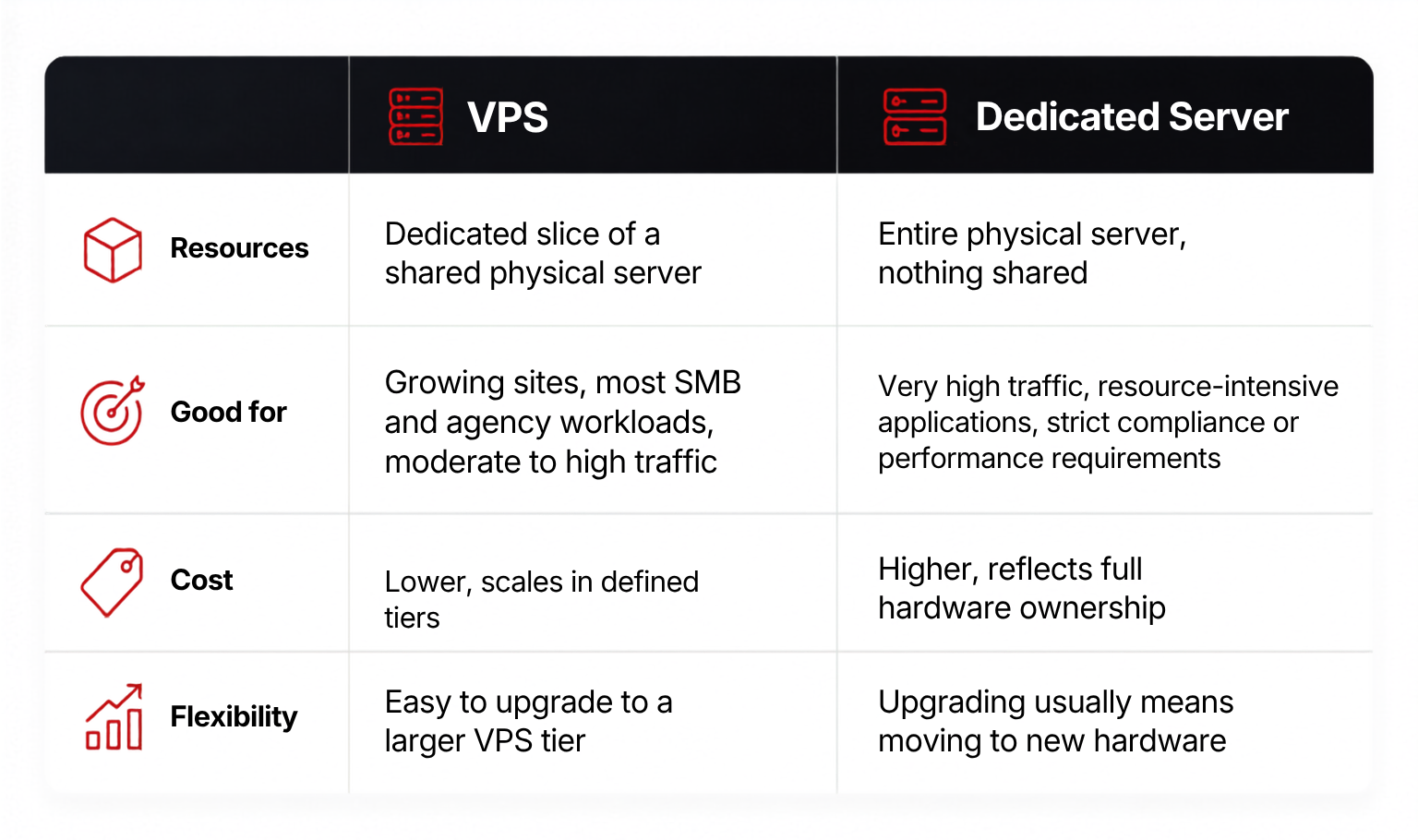 For most businesses reading this, a VPS is the right next step, not a dedicated server. Dedicated servers make sense when you’re running resource-intensive applications at real scale, have compliance requirements that call for physically isolated hardware, or have already outgrown the largest practical VPS tier for your workload. If you’re not sure which category you’re in, that uncertainty itself is usually a sign you’re still solidly in VPS territory.
Managed VS Self-managed VPS: Who Should Choose Which
This decision comes down to what your team actually has time for, not what sounds more technically impressive.
Self-managed VPS makes sense if you have someone in-house, or a developer you trust, who is comfortable with server administration: security patches, software updates, configuration, and troubleshooting when something breaks at an inconvenient time. You get more control and typically a lower price, in exchange for owning that responsibility.
Managed VPS hosting means the provider handles the server-level maintenance, security updates, and monitoring, so your team can focus on the site or application itself rather than the infrastructure underneath it. For most SMBs and agencies managing client sites, this is the more realistic choice. It isn’t about ability, it’s about where you actually want your time going.
A reasonable way to decide: if a server issue at 11pm on a Saturday would mean waking someone up who has other things to do, managed is probably worth the difference in price.
What Migration to VPS Actually Looks Like in Practice
The biggest reason people delay moving to VPS isn’t cost or complexity, it’s the fear of downtime during the move itself. That fear is reasonable, but migrations done properly are far less disruptive than most people expect.
A typical migration involves setting up the new VPS environment, copying your site and database over, testing everything on the new server before it goes live, and then switching your domain’s DNS to point to the new server. With DNS TTL lowered in advance, the actual cutover window is usually measured in minutes, not hours, and can often happen with no visible downtime at all if it’s planned properly.
The part worth asking your provider about directly is what happens if something doesn’t work as expected on the new server. A provider that offers migration as a real, hands on service, rather than a document telling you to do it yourself, removes most of the actual risk. That’s usually the difference between a migration that takes an afternoon and one that turns into a week of anxiety.
How to Choose a VPS Provider
Once you’ve decided VPS is the right move, the provider you choose matters as much as the decision itself. A few criteria worth using, rather than just comparing prices:
Server location. If your customers are in Europe, a European data center reduces latency and, depending on your industry, may matter for data residency and compliance reasons too.
Virtualization technology. KVM virtualization gives you a genuinely isolated environment with your own kernel, as opposed to lighter forms of virtualization that share more with other accounts on the same hardware. It’s worth asking which technology a provider actually uses rather than assuming.
Real support, not just a ticket queue. Ask what happens when something goes wrong outside business hours. Actual 24/7 technical support, not just a form that gets answered the next morning, is worth more than a slightly lower monthly price.
Transparent pricing. Watch for what happens after the introductory period ends, what counts as an overage, and whether basics like backups and support are included or billed separately. The advertised price and the actual cost of running your site reliably aren’t always the same number.
Room to grow without migrating again. Ask what upgrading actually looks like a year from now. A provider with multiple VPS tiers you can move between without a full migration saves you from repeating this entire decision sooner than you’d like.
None of these criteria are about picking the best provider in the abstract. They’re about matching what you actually need to what you’re paying for, which is a more useful question than which provider has the flashiest homepage.
What About the Cost Difference
The concern that stops a lot of people is straightforward: VPS costs more than shared hosting, and it should, since you’re no longer splitting a server with dozens of other accounts. But the comparison worth making isn’t shared hosting’s price against VPS’s price in isolation. It’s the cost of the traffic and sales you’re already losing to slow load times and intermittent errors, weighed against a predictable monthly increase that tends to be smaller than people expect before they actually look at plans.
For most growing sites, entry-level VPS pricing sits closer to shared hosting than to dedicated servers, which is exactly why it works as the middle step rather than a dramatic jump.
The Bottom Line
Outgrowing shared hosting doesn’t usually happen all at once. It shows up as a pattern: resource warnings, inconsistent performance, and problems that trace back to other accounts on the same server rather than anything you’re doing wrong. Once that pattern is familiar, moving to VPS is less of a leap than it feels like from the outside, and the isolation and consistency you gain tend to solve most of the problems that got you looking in the first place.
If you’re trying to figure out whether you’re actually at that point, we’re happy to take a look at what you’re running and give you an honest answer either way.
The AltusHost Team
FAQ
Q: When should a business upgrade from shared hosting to VPS?
The clearest signals are resource limit notifications that keep recurring, noticeably slower performance at moderate (not extreme) traffic levels, and performance problems that trace back to other accounts on the same shared server rather than your own site. If these are becoming regular rather than occasional, it’s usually time to move.
Q: What is managed VPS hosting?
Managed VPS hosting means the provider handles server level maintenance, security updates, and monitoring, so you get the dedicated resources and isolation of a VPS without needing in-house server administration expertise. It’s the more common choice for SMBs and agencies that want to focus on their site or clients rather than infrastructure.
Q: What is the difference between VPS and dedicated server hosting?
A VPS gives you a dedicated, isolated slice of a shared physical server, while a dedicated server gives you the entire physical machine with nothing shared. VPS is the right fit for most growing businesses; dedicated servers make sense at very high traffic or with specific compliance and performance requirements.